Convincing clients to renew their subscriptions is one thing for SaaS businesses, and helping them achieve their goals, adopt the product, and value their relationship with the business is another. This relationship and the customer’s success is what makes a business boom.
While these activities are necessary for a business to function, they do become difficult to manage as the customer base grows with the business. Customer details are one of the most valuable pieces of information for a company, and having access to them should be convenient and hassle-free. When this information is scattered across emails, CRMs, Excel sheets, and support tools, customer success managers find it difficult to –
- Identify disengaged accounts
- Prioritize who to follow up with
- Figure out why a customer with a good health score is now in a churn risk zone
Customer retention software comes to the rescue here. An ideal customer retention platform saves the business from a haphazard approach, as it brings all the customer information together, highlights the potential risks, and helps teams take action before it is too late.
Not all platforms offer the same capabilities. One may focus on product engagement, others on customer communications, and some on customer health and success workflows. You need to find a platform that checks all the boxes.
Before investing in a solution, here are 10 questions that you must check to select the best customer retention software for your SaaS business in 2026.
1. Does It Provide a Unified View of Customer Data?
Customer success teams can make effective decisions only when the information that they are referring to is reliable. If account history is scattered across multiple tools, CSMs may miss important details about customer behavior, expectations, or unresolved issues.
Centralized Customer Profile
Look for customer retention software that brings all the necessary data into a single customer profile. This includes –
- Account details
- Revenue
- Conversations
- Support tickets
- Meetings
- Product usage
- Prior interactions
A unified view helps CSMs understand the customer’s current situation without switching between multiple applications.
Cross-Platform Data Synchronization
Check whether the platform can gather information from the existing systems into the customer profiles. Some things that should be taken into consideration include –
- How frequently the data is updated.
- Whether the synchronization requires manual intervention.
- How easily the teams can access old information.
The goal is to give everyone working on an account consistent, accessible customer context.
2. Can it Identify Churn Risk and Track Customer Health
Customer retention remains an important operating metric for SaaS businesses. HSBC Innovation Banking’s 2026 reported a median annualized churn of 13% in 2025, down from 16% in 2023 among the companies studied. For SaaS teams, identifying at-risk accounts early can help them investigate issues before renewal conversations.
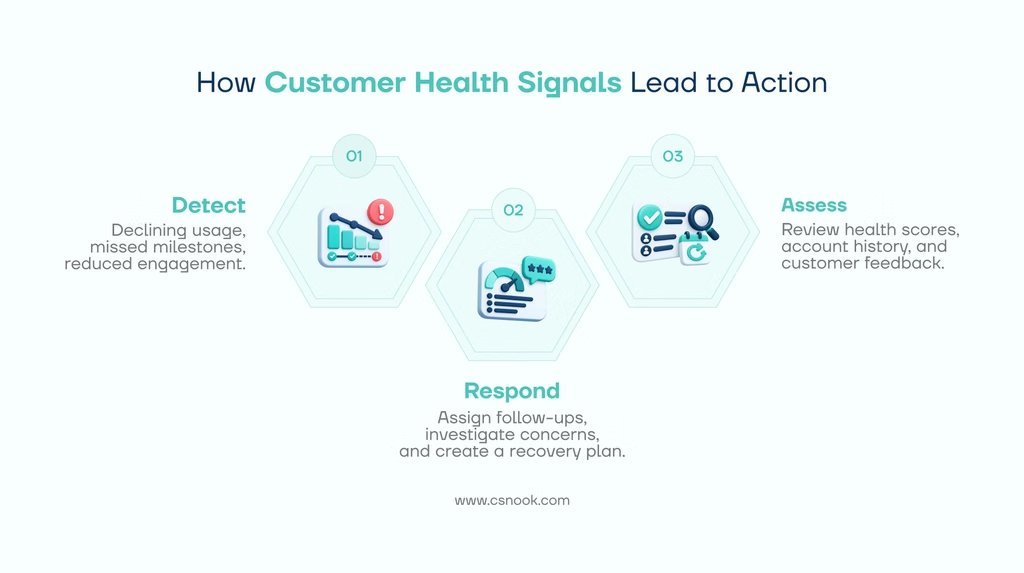
Customers rarely inform the teams about their intentions of leaving without showing any signs of the same. Some of these signs that might even go unnoticed include –
- Declining product usage
- Missed onboarding milestones
- Unresolved concerns
- Reduced engagement
All these signs are an indication of potential churn, and these accounts hence require more attention.
Customer Health Scores and Risk Indicators
Evaluate how the software calculates customer health scores. Can you choose the signals that matter to your business, such as product activity, account revenue, engagement, or lifecycle progress?
A useful health score should help teams prioritize accounts and understand which customers need intervention. It should also allow them to investigate the signals behind a declining score instead of just relying on numbers alone.
AI-Powered Account Summaries
AI can help CSMs review account history, customer sentiment, and potential churn concerns, reducing the time that is otherwise spent on going through old conversations.
For example, an account summary might highlight repeated concerns about pricing, reduced product activity, or a change in key stakeholders. These insights give CSMs a starting point for investigating risk and planning their next conversation.
It should be noted that predictive capabilities differ on the basis of the platform. Hence, it must be evaluated that –
- How the software identifies risks
- What information supports its conclusions
- Whether your team can act on those insights.
3. Can You Automate Customer Success Workflows and Interventions?
Identifying which customers could be at risk of churn is only the first step. The issue they could be facing must also be looked at and should be responded to.
Automated Tasks, Alerts and Follow-Ups
Check whether the software can notify the relevant CSM when an account’s health declines, assign follow-up tasks, or trigger an appropriate workflow.
For instance, if a customer has not completed an important onboarding milestone, the system could create a task for the account owner to investigate the reason behind the delay.
Customer Success Playbooks
Playbooks help the teams equalize activities that are recurrent. These activities include –
- Onboarding
- Adoption reviews
- Renewal preparation
- Risk management
Look for programmable workflows that support conditions, task assignments, reminders, and follow-up actions. The platform should make it easier to execute a process consistently without removing the human judgment that could be required for individual customer situations like escalations that require specific attention.
4. Does It Support Customer Engagement Across the Lifecycle?
Customer retention involves multiple stages, from onboarding and product adoption to renewals and expansion. A platform should help your team maintain meaningful engagement throughout this journey.
Lifecycle-Based Communication
A customer retention software’s support towards onboarding reminders, customer check-ins, renewal follow-ups, and re-engagement activities must also be evaluated.
Some platforms provide built-in email, SMS, or in-app messaging, while others focus on coordinating tasks and connecting with existing communication tools. You can make your decision on the basis of how your team already engages customers.
Customer Segmentation
Customer segmentation allows teams to group customers according to attributes such as health score, subscription plan, revenue, product usage, or lifecycle stage.
Let us understand this with the help of an example. A SaaS company could segregate its high-value accounts from those with declining product usage by creating separate segments. This way, they will be able to prioritize customers who require proactive outreach efforts. Dynamic segments that update when customer data changes can make this process more efficient.
5. Does It Integrate With Your Existing SaaS Tech Stack?
Customer retention software should complement your existing tools rather than increasing the workload by creating another isolated source of information.
CRM, Support, and Communication Integrations
Check compatibility with the systems your team depends on, including CRM platforms, email, calendars, support tools, and product analytics solutions.
Look beyond the number of available integrations.
- Which information each connection brings in.
- Whether it updates automatically.
- Whether the integration supports your actual workflows.
Integration Setup and Maintenance
Ask about implementation requirements, data mapping, synchronization limitations, and ongoing maintenance.
A platform that requires frequent manual exports or complicated “quick fixes” can potentially create more operational effort than it saves. Hence, integrations that make customer information accessible without adding unnecessary administrative work should be valued.
6. Can It Turn Product Usage Data Into Actionable Insights
It is easy to get buried in numbers and charts showing how often people log into your software. But data alone can’t tell you if customers genuinely love your product or if they are just trying to figure it out.
Feature Adoption and Usage Trends
Look for visibility into which features customers use, how frequently they use them, and whether their activity changes over time.
Low usage of an important feature could indicate that a customer needs additional guidance. A sudden decline in activity could also warrant a conversation with the account owner.
Connecting Usage to Customer Health
The most useful customer retention software connects behavioral information with other account signals.
A customer who has stopped using a key feature and has also raised concerns during recent meetings may need more immediate attention than an account with declining activity alone.
Check whether product events can inform health scores, segments, or workflows. This helps teams turn usage data into practical customer success actions.
7. Can It Scale With Your Business While Keeping Customer Data Secure?
The software that works for a small customer success team may not meet the needs of a growing organization. As your customer base expands, you need a platform that can support a large number of accounts, workflows, users, and reporting requirements.
Scalability and Customization
Evaluate whether the platform can accommodate your expected account growth, different customer segments, additional products, and evolving lifecycle stages.
Custom fields, configurable health scores, and flexible reporting can help teams adapt the software to their processes without creating unnecessary complexity.
Permissions and Data Governance
Check role-based access control, user permissions, data handling practices, and available audit records.
Your team should be able to provide appropriate access to customer information, but at the same time, it should also limit unnecessary exposure. If your business has specific security, contractual, or regulatory requirements, make sure that the platform meets them before committing.
8. What Is the Total Cost of Customer Retention Software?
The subscription price is only one part of the investment. Aspects like implementation, training, integrations, and additional features have their fair share of contribution to the total cost of ownership.
Subscription Pricing and Feature Limits
Understand how the vendor calculates pricing. Costs may depend on the number of users, customer accounts, tracked contacts, or selected features.
Check which capabilities are included in each plan and whether you will need paid add-ons as your requirements grow.
Implementation and Long-Term Costs
Consider the time required to –
- Configure the platform
- Migrate customer information
- Connect integrations
- Train your team
Then evaluate the value the software could provide through better visibility, more efficient workflows, and earlier intervention on at-risk accounts.
Rather than choosing the cheapest option, compare the total cost against your business needs and expected benefits. A platform with a lower subscription price may not be the better investment if it creates additional manual work.
9. Is It Easy for Your Customer Success Team to Use Every Day?
Even a feature-rich platform will struggle to deliver value if customer success managers find it difficult to use. Adoption depends on whether the software fits naturally into the team’s daily work.
Dashboard Clarity and Navigation
Check whether users can quickly find account information, review customer health, access upcoming tasks, and understand which accounts need attention.
A clear dashboard should make prioritization easier instead of overwhelming users with unnecessary metrics.
Workflow Setup and Learning Curve
Evaluate how easily your team can create segments, configure health scores, build playbooks, and generate reports.
Ask whether routine changes require technical assistance and what training resources are available. During a demonstration, have the people who will actually use the platform test these activities themselves.
The objective is to find software that supports your team’s workflow without creating another layer of administrative work.
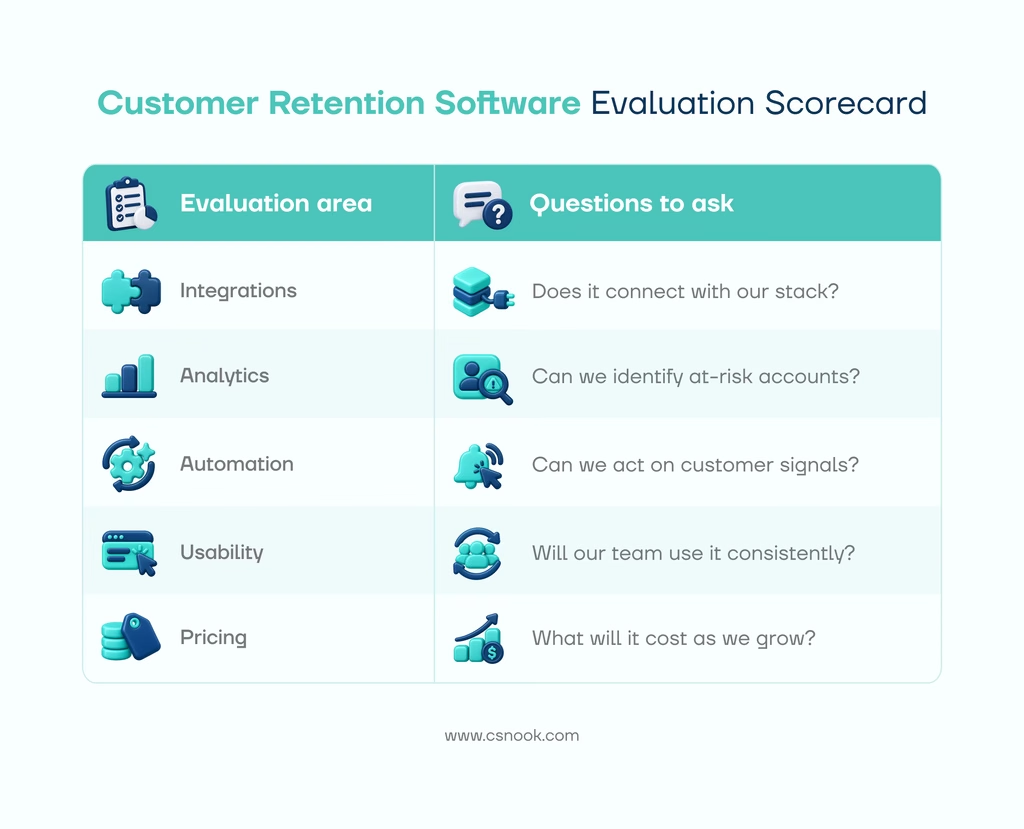
10. Can You Validate Its Capabilities With Your Own Customer Data?
Product demonstrations are useful, but they may not reveal how well a platform fits your actual processes. A trial or pilot gives you an opportunity to test the software against real requirements.
Test With Representative Customer Accounts
Wherever possible, use a representative sample of customer data to evaluate account profiles, integrations, health scores, segmentation, and reporting.
Check whether the platform displays the information your CSMs need and whether its insights are useful for your customer base.
Test Real-World Workflows
Build a practical scenario, such as identifying customers with declining product usage, assigning follow-up tasks, and tracking what happens next.
Evaluate the requirements for configuration, who the notification is reaching, and if the reports provide useful visibility.
Before signing a contract, clarify trial limitations, data import requirements, support availability, and any costs associated with implementation.
Wrapping It Up
The best customer retention software is not necessarily the platform with the longest feature list. It is the one that addresses your biggest retention challenges and fits the way your team works.
Start by identifying where customers tend to disengage. If your team lacks account visibility, prioritize unified customer profiles and integrations. If churn risks go unnoticed, focus on health scoring and actionable insights. If follow-ups are inconsistent, evaluate automation and customer success playbooks.
For B2B SaaS teams, a platform that connects customer data, health signals, lifecycle progress, and daily workflows can make retention activities easier to manage.
CSNook brings these capabilities together in one customer success workspace. Its customer profiles combine account information, conversations, revenue, and product usage. Teams can configure health scores, build dynamic customer segments, automate playbooks, and use Nook AI to generate account summaries and explain potential churn risks.
Common Questions
What features should customer retention software have?
Important features include unified customer profiles, customer health scores, churn-risk indicators, workflow automation, segmentation, product usage analytics, integrations, and reporting. The right combination depends on your business model and retention challenges.
How do you measure the effectiveness of customer retention software?
Measure its effectiveness by tracking changes in customer retention rate, customer churn rate, gross revenue retention (GRR), and net revenue retention (NRR). You can also monitor operational indicators, such as how quickly teams respond to at-risk accounts and whether customer success workflows are completed consistently. Compare results over consistent periods and customer cohorts to understand whether performance is improving.
Is customer retention software suitable for small SaaS businesses?
Yes. Small SaaS businesses can benefit from customer retention software when managing customer information manually becomes difficult or follow-ups start getting missed. The right solution should match the size of the customer base, the complexity of customer relationships, and the team’s current processes without introducing unnecessary administrative work.
How long does it take to implement customer retention software?
Implementation time depends on the platform’s complexity, the volume and quality of existing customer data, the number of integrations required, and the workflows being configured. A straightforward setup may take less time than an implementation involving multiple systems and extensive data migration. Before committing, clarify the vendor’s implementation process, responsibilities, and expected timeline.